Your coding agent, inside the Godot editor.
An editor addon for Godot 4. The agent reads and edits scenes and scripts with the editor’s own tools, with undo, runs the game and tests it. Every change goes through permissions you choose. Run several sessions at once, one per dock tab, each with its own agent and account. Free and MIT licensed.

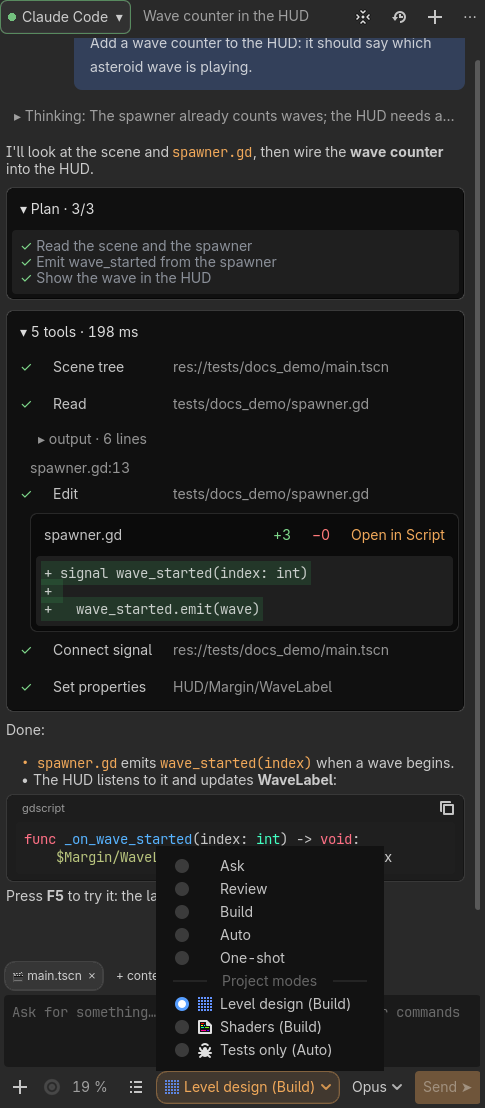
Five modes. You decide what each one may touch.
Every action belongs to a group, and each group has a decision per mode. Ask shows a card with the diff; Deny tells the agent why. The matrix lives in project_config.tres, so your team shares it. On top of any of them, a project mode (res://agent_modes/*.json) with its own name, instructions and model limits which files the agent may write, in One-shot too, and never allows more than its base mode. When the task calls for another mode, the agent proposes it on a card with its reason, and you decide.
| Group | AskAnswers about the project. Reads only. | ReviewFindings as marks in the Script Editor. | BuildEdits and runs, asking first. | AutoNo cards for what can be undone. | One-shotA whole goal, with budgets. |
|---|---|---|---|---|---|
| Read & diagnostics | Allow | Allow | Allow | Allow | Allow |
| Edit scenes & files | Deny | Deny | Ask | Allow | Allow |
| Run the game | Deny | Ask | Ask | Allow | Allow |
| Shell commands | Deny | Deny | Ask | Ask* | Ask |
| Project settings & export | Deny | Deny | Ask | Allow | Allow |
| Install from the Asset Store | Deny | Deny | Ask | Ask | Ask |
* In Auto, read-only and build commands on the allowlist run on their own; rm, git push, curl and installers always ask. In any mode, writing a .tscn by hand or a project file from the shell is rejected: scenes change only through the editor.
70+ editor tools. The agent uses Godot, not a text editor.
Scene edits are steps in Godot’s own undo. Open scripts and unsaved buffers are respected. When the agent runs Godot from the shell, it uses the same binary as your editor.
Read the project
Scene trees with non-default properties, one node in detail, editor state, and the API of any class in your exact Godot version.
Edit scenes
A whole subtree in one call and one undo step. Nothing is created if one item is invalid.
Run and look
Run a scene with simulated input, read the real errors, capture frames. Input plays by physics frame, so a run reproduces at any framerate. Playtest answers passed, failed or could not test, with evidence and optional video. Up to 4 instances at once, to test multiplayer.
Check the work
Parse scripts without running, build C# with dotnet, and catch bodies without shapes or tiles without collision. Build your GDExtension with SCons, CMake or Cargo, with errors by file and line, and test it in a separate headless Godot, so a crash never takes down the editor.
Tilemaps & animation
Turn a texture into an atlas, paint terrains, build AnimationPlayer tracks and SpriteFrames from a sheet.
Files & Asset Store
Moves keep the uid and rewrite every res:// reference. Assets install into addons/ without overwriting.
Bake and export
Rebuilds navigation after a level changes, bakes lightmaps and occluders with the editor’s own Bake button, and exports with your presets in a separate headless Godot, with errors, time and size. export_presets.cfg never changes.
Project tools
Give the agent your own tools in GDScript: each res://agent_tools/<name>.gd becomes godot.<name>. They only load on a machine where you approved their code, and every call asks for permission.
Restart and resume
When a plugin or a setting needs an editor restart, the agent restarts it in any project and gives its reason on the permission card. Every tab comes back with its session, mode and name, and the one that asked carries on. It’s also under ⋯ → Restart and resume.
A build that crashes the editor rolls back on its own.
In projects that build a GDExtension, the editor can open under a supervisor. If a new build crashes it while starting, the supervisor puts back the last build that started fine, reopens the editor, and the agent goes on with the backtrace. The agent loads new builds with restart_editor.
A verdict only counts if the agent played.
Say what to check by playing. The agent runs the game, sends input and captures frames, then answers passed, failed or could not test. It doesn’t change the project.
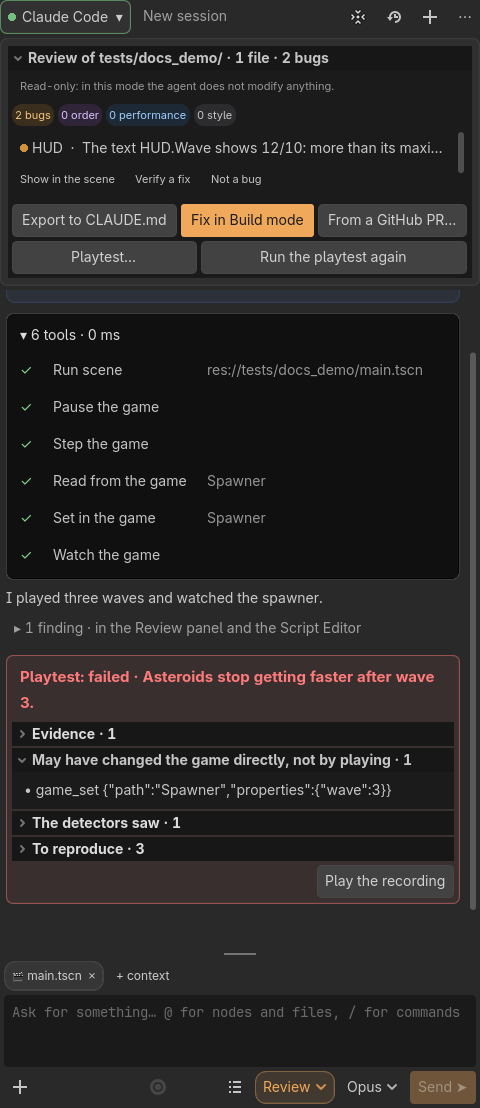
Checked verdict
Without playing the game, or without a captured frame when the verdict depends on how something looks, it counts as could not test. It also lists what may have changed in the running game without playing.
In-game detectors
They report what the agent wasn’t looking at, with a picture of the moment: NaN transforms, bodies out of the world, long falls, long frames and a HUD past its maximum.
Real clicks, exact frames
Menus are used with real clicks instead of guessed pixels. It can play turn by turn with exact physics frames, or run a short script inside the game to react in the same frame.
Check, reach, explore
Verify something, reach a goal or go through a level and say what looks wrong. A script error doesn’t end the run: the game goes on and the error is listed.
Findings to act on
Findings go to the panel, and one marked as not a bug doesn’t come back. Run the last playtest again as it was, or play the recording in the editor.
Memory between runs
Playtests keep what they verified about your game and which files changed since, so the next one rechecks what may be out of date.
Regressions without tokens
A playtest that passes leaves a script that repeats the check. Run regressions in the findings panel runs them all without the agent and without using tokens, and says which ones fail. Measure regressions plants small bugs in an in-memory copy of the game and tells you which ones they catch. CI workflow… writes the GitHub Actions workflow that runs them on every push. For CI, commit res://.godot_agent/playtests/regressions/ and run:
godot --headless --path . --script res://addons/godot_agent/playtest/regression_cli.gdGive it a whole game. Get a branch back.
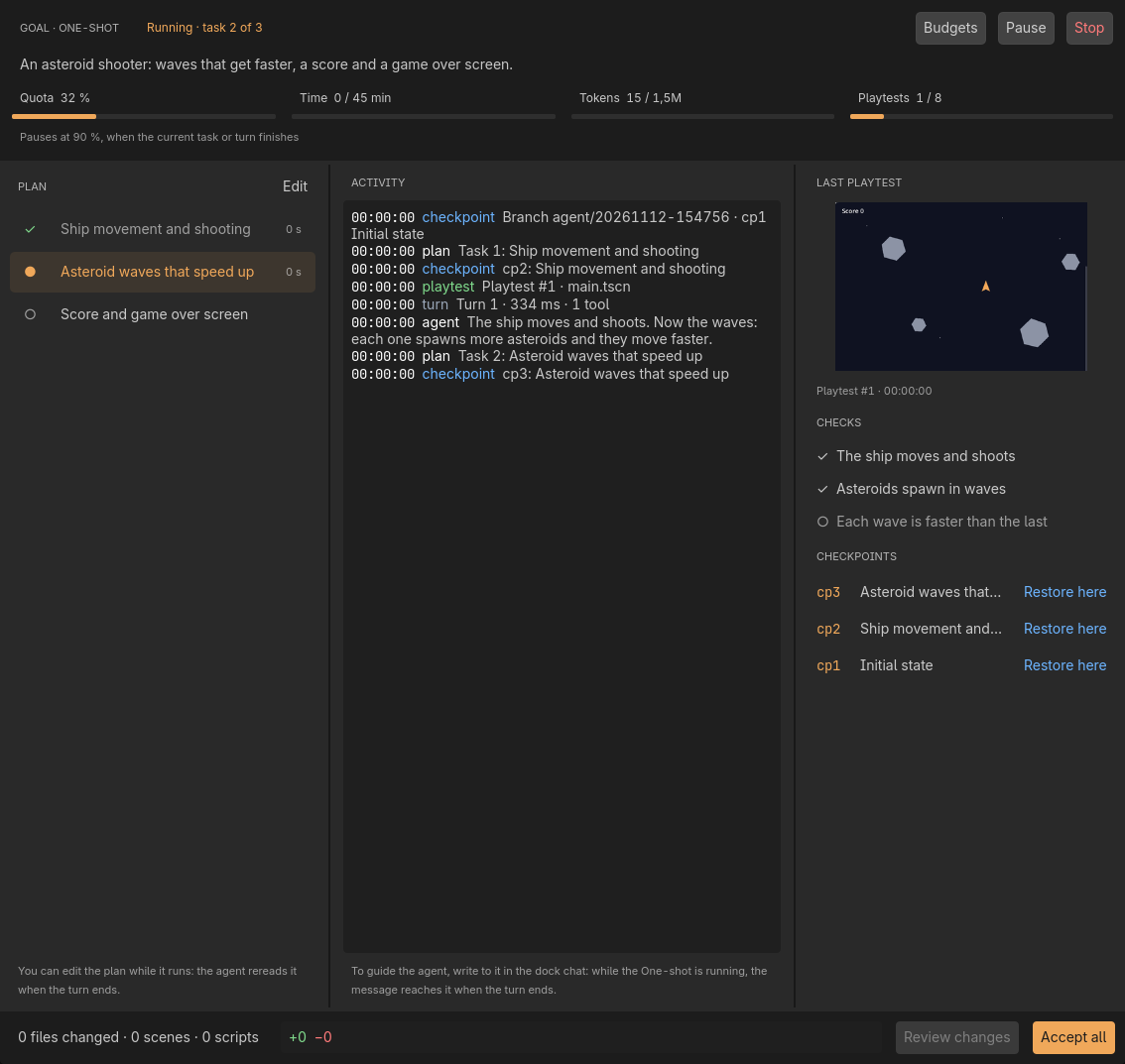
“A 2-player Pong with score.” The agent writes a spec, plans, builds, playtests and reports. A separate evaluator plays the result before anything counts as done. Each run opens in its own dock tab. It never merges.
- Spec
spec.md: mechanics, game loop, visual direction, what “done” means. Add reference files (a GDD, concept art, a level sketch) and the agent reads them first. You can review the spec before the build starts. - PlanTasks with live durations. Edit the plan while it runs; the agent rereads it after each turn.
- Build and verifyEdit,
run_scene, look at frames, read errors, report checks as pass, fail or pending. - CheckpointsOne
cpNcommit per task onagent/<date>. Restore any of them and resume from there. - QAA new session that never saw the builder’s chat plays the game, checks it against your reference files and scores playability, function, visuals and feel, and code. It can’t edit, or pass a check it could not test.
- ReportWhat the harness measured, not what the agent claims: time per task, tools, failures, loops, quota pauses.
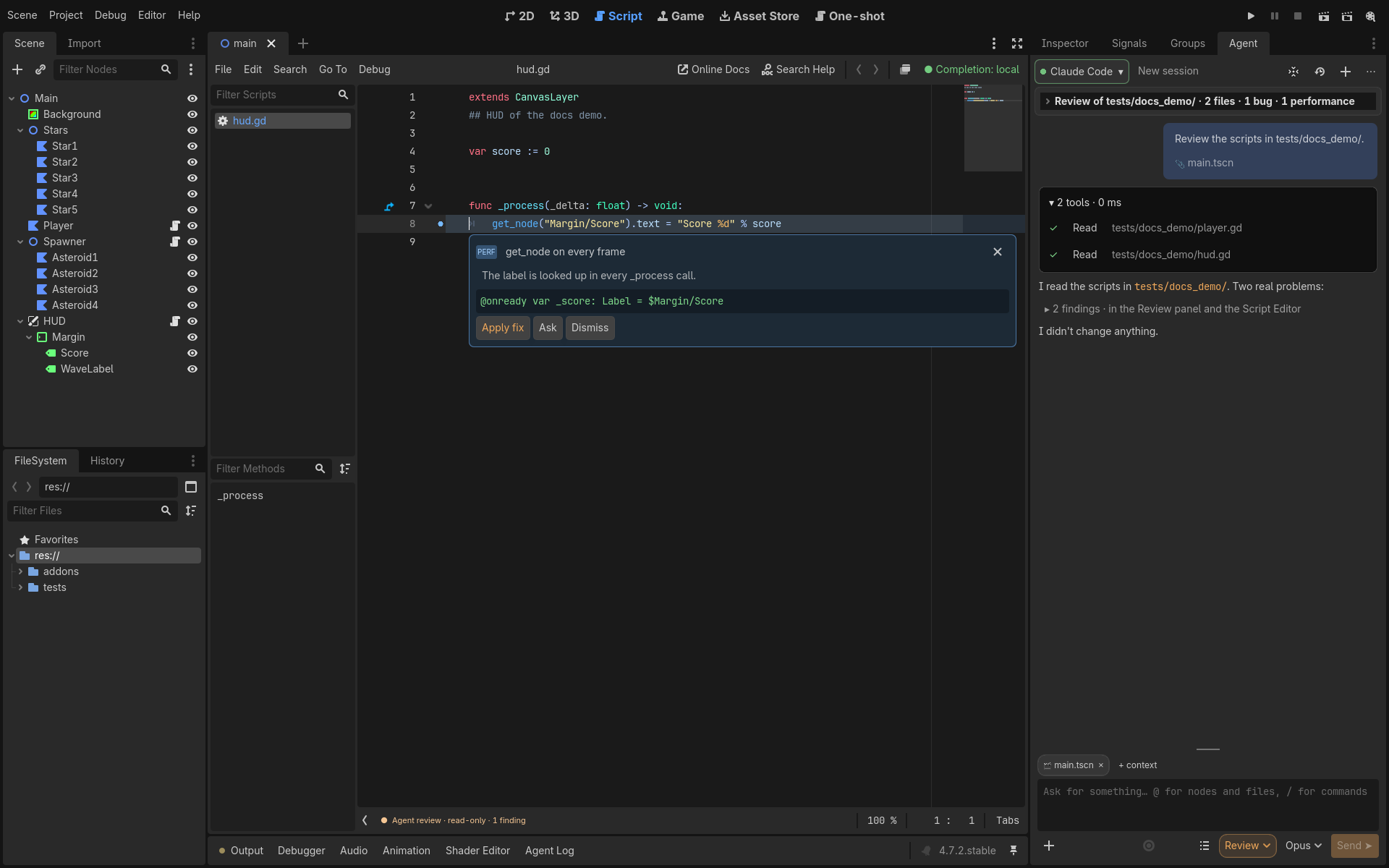
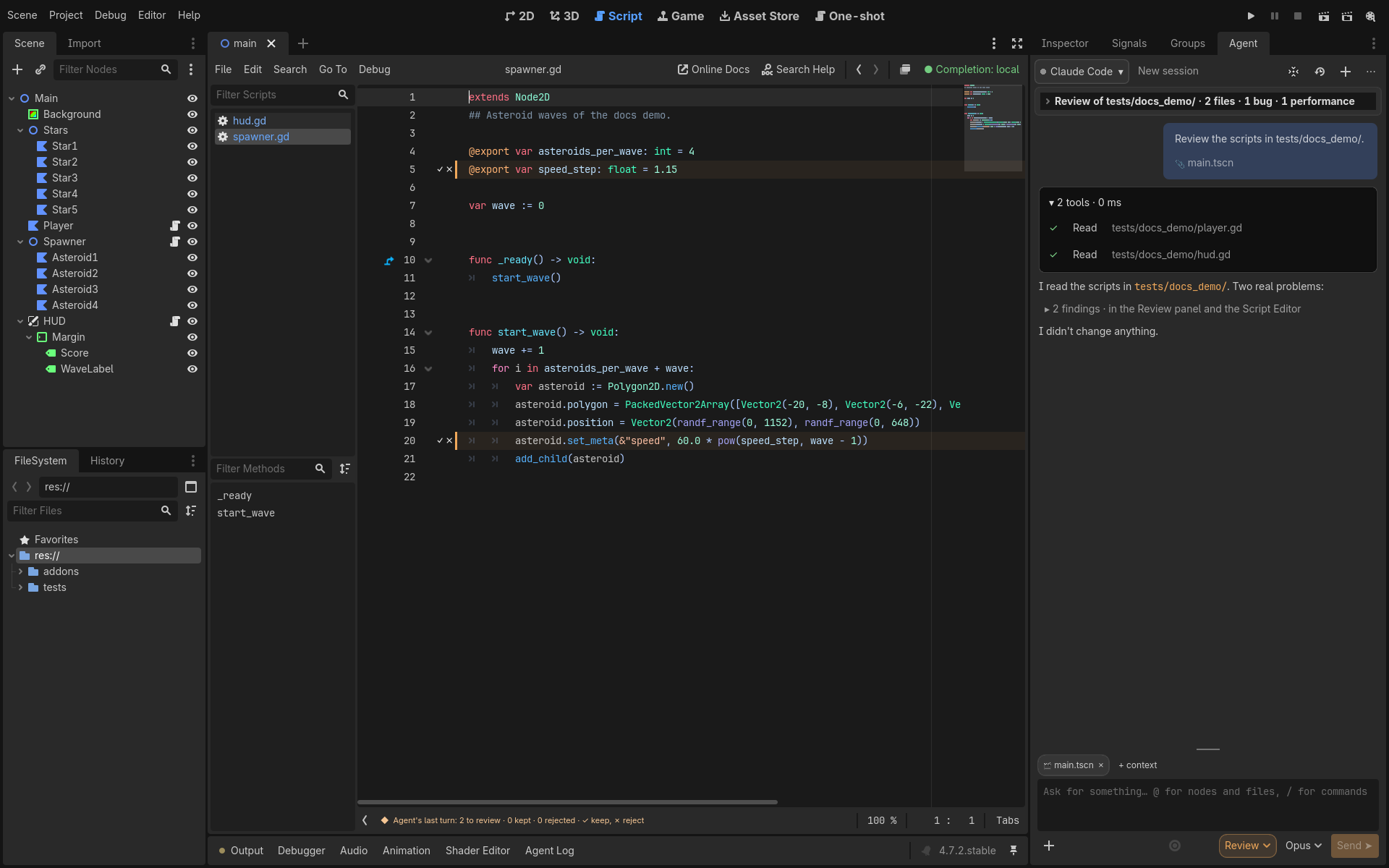
Findings land on the line.
Bugs, structure, performance and style show as marks in the Script Editor, with Apply fix, Ask and Dismiss. Pull a GitHub PR’s comments in as findings, or export the review to CLAUDE.md as conventions. And after each turn, the agent’s changes are marked in the gutter: ✓ keeps one, ✗ rejects just that one.
Grey suggestions, local by default.
Rules that know Godot, lines your project repeats, and an n-gram model of your code. No network unless you add Ollama, llama.cpp or another LLM.
@onready var wave_label: Label = $HUD/WaveLabel

func _physics_process(delta: float) -> void:
Plans checked by playing.
Ask for a plan with /plan, edit or approve it, and the agent builds it in Build.
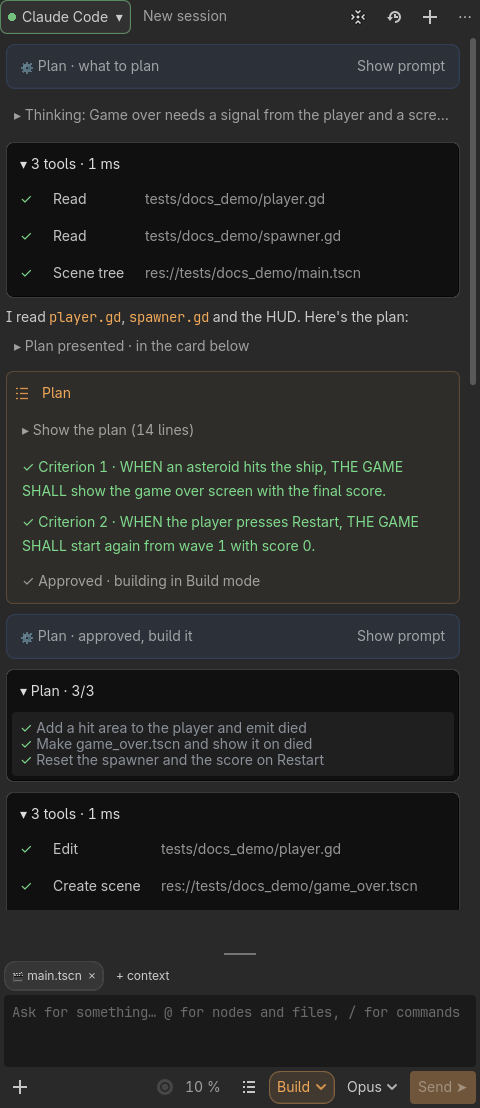
Playable criteria
Each criterion in the plan (“WHEN the player touches an enemy, THE GAME SHALL take one life away”) is played after the build, without changing the project. The ones that fail go back to the agent with what the playtest saw, and only those are played again.
Second opinion
Another agent, read-only and without the conversation, reviews a turn’s changes, a plan or your question. Its answer reaches the agent only if you send it.
Recipes
Save a request you repeat (a new enemy, an options screen) in res://agent_recipes/, with parameters and checks the result must pass. /recipe opens a form built from its parameters.
Rules by file
Rules in .agents/rules, .claude/rules or .cursor/rules reach any agent when a turn touches a matching file.
Project hooks and checks
Run the regressions, your GUT or gdUnit4 tests or a command after each turn that changes files; a failure goes back to the agent to fix. Hooks react to saving, the game ending or an export.
Follow the agent
The editor jumps to what the agent edits: the script at the changed line, or the scene with the node selected. Ctrl+Enter sends your message and follows it for that request.
What it will never do.
Godot skills for any agent.
Six plugins for working on Godot 4 games: architecture, shaders, C++ GDExtensions, assets, video and testing. They work in Codex, Cursor, Gemini CLI, OpenCode, Claude Code and others, with or without this addon. Inside the addon, the Extensions window installs gdscript and shaders in one click, and Use with all agents shares your project’s or your own skills with Google Antigravity, Codex and the rest.
gdscript
Design and review GDScript: where code and data live, signals and autoloads, state machines, components, pools, Resources, saves and mods.
shaders
Non-trivial shaders in Godot 4.6+: spaces and matrices, custom light(), normal maps, procedural shapes, post-processing and ray marching.
gdextension
C++ GDExtensions with godot-cpp 10: bindings, builds and exports for each platform, debugging crashes and leaks, and wrapping C or C++ libraries.
blender
Build and check assets with headless Blender 5 Python, then bring them to Godot with the right axes, collisions, materials and animations.
godot-video
Videos from real footage of your game: repeatable capture, trailers, simple music, design document checks and development films. Needs only Godot, ffmpeg and Python.
godot-testing
Check the game by running it: screenshot tests against approved images, and before and after performance comparisons.
npx skills add dannroda/godot-agent-plugins/plugin marketplace add dannroda/godot-agent-pluginsMIT. For the basics, the Claude Code marketplace also lists four plugins from awesome-gamedev-agent-skills.
Three steps to the first prompt.
Godot 4.7 or newer. For Claude Code, Node.js with npx. For C#, Godot .NET and the .NET SDK. For GDExtension, a compiler and SCons, CMake or Cargo. Tested on Godot 4.7.2, 4.8-beta3 and Godot .NET 4.7.2, on Linux: Claude Code end to end and Google Antigravity with a real session walkthrough. Codex, Windows and macOS not verified yet. Interface in English and Spanish. MIT, free: the agent uses your own account with its provider.
Known issue on Godot 4.7.2: saving a scene with Ctrl+S can make the engine print an error (p_I->data != this), and in sessions where an agent was changing the project the editor sometimes crashed right after such a save. That crash was never seen without the addon; that it comes from the engine error is likely but not confirmed. The addon’s own saves skip the preview; only the editor’s Ctrl+S is affected. Godot 4.8-beta2 and 4.8-beta3 still print the error; 4.8-beta2 didn’t crash in 12 runs.
- Copy
addons/godot_agent/into your project’saddons/folder. - Project → Project Settings → Plugins → enable Godot Agent Harness.
- In the Agent dock, Add Claude Code (or another agent), sign in and Start session.
Godot Agent Harness · MIT · Privacy · No telemetry, no server of its own.